
How do I bill an agency or property manager?
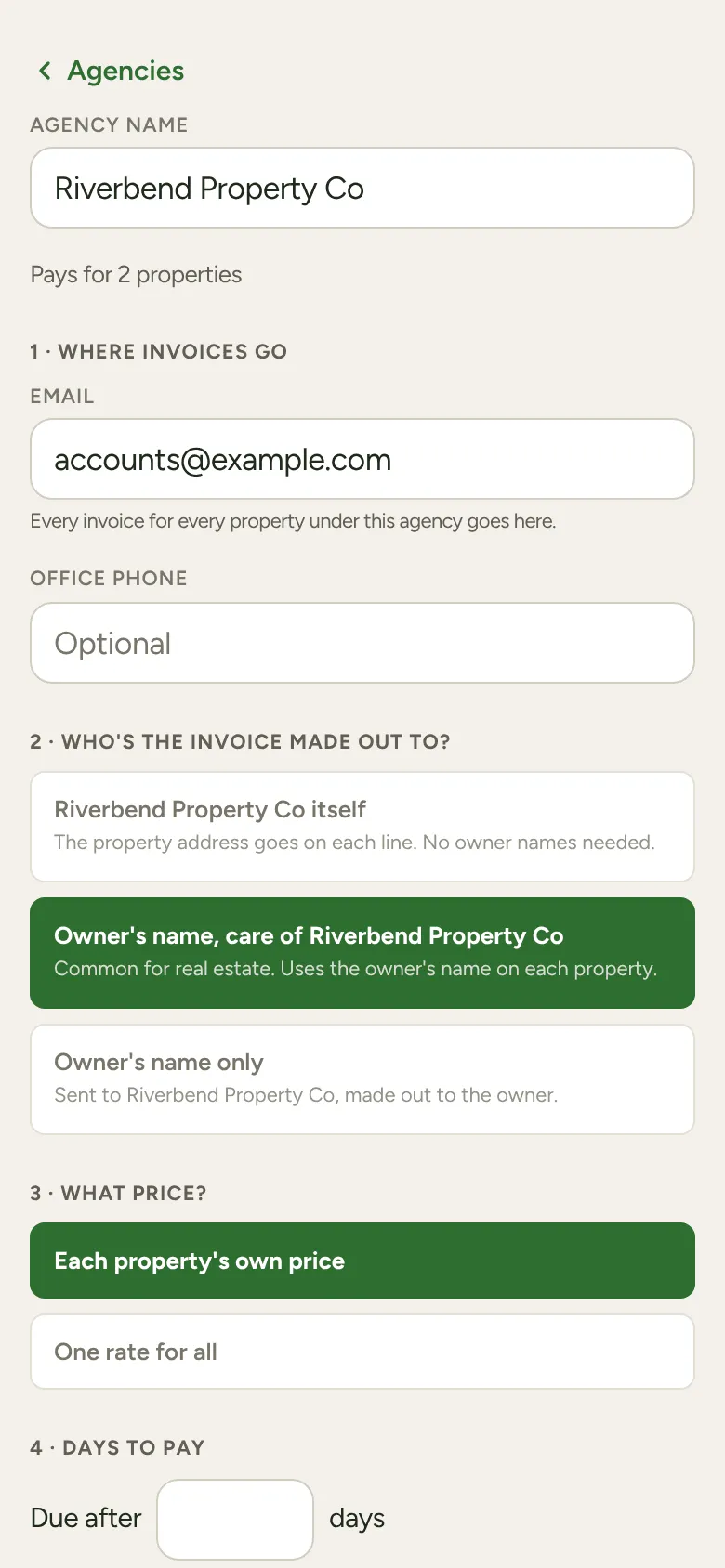
Tap More, then Agencies, then + Add agency. Answer its four questions, then put its properties under it. Every job at those properties is then billed the agency’s way.
-
Tap More, then Agencies, then + Add agency, and type the agency’s name.
-
1 · Where invoices go: the agency’s billing email. Without it, its invoices can’t be sent.
-
2 · Who’s the invoice made out to? Pick the agency itself (the property address goes on each line), Owner’s name, care of the agency (common for real estate), or Owner’s name only. A new agency starts on the agency itself.
-
3 · What price? Keep Each property’s own price, or choose One rate for all and type the rate, per hour or per job.
-
4 · Days to pay: how long they have. Leave it blank to use your usual terms.
-
Put its properties under it. Bill customers to an agency (on the Agencies screen) finds customers who share an agency’s email address. Inside an agency, Find more customers for that agency does the same for just that one. Or open one customer, tap Billed to, choose An agency and pick it. (That row shows once you have an agency and the customer pays by invoice.)
To take a property off, tap Remove beside it on the agency’s screen.
Checking it looks right
Section titled “Checking it looks right”With invoices going to Xero, the agency’s screen shows What the invoice will look like, using one of its real properties. Each customer’s Billed to row also says Invoice will read: and the name it’ll use.
If the person at the property isn’t the owner, add the owner on the customer’s Billed to card under Owner’s name (on the invoice). The invoice uses it; the name at the top stays as the person who lives there.
It asks before a price changes
Section titled “It asks before a price changes”If a move would change what a property is charged, LawnFlow asks first, for example: “14 Quenda Loop, Como moves from $70 to $90 an hour under Riverbend Property Co. Continue?” Cancel and nothing changes. Changing an agency’s rate asks the same way, naming how many properties it reprices.
Spotting agencies
Section titled “Spotting agencies”When several customers share an agency’s email address, More shows Might be an agency under Needs you, and the customer’s page shows a line with Have a look. Set the agency up from there, or tap Not an agency and LawnFlow stops asking about that address.